 TaskBar
Your Google Tasks, one click from the menu bar.
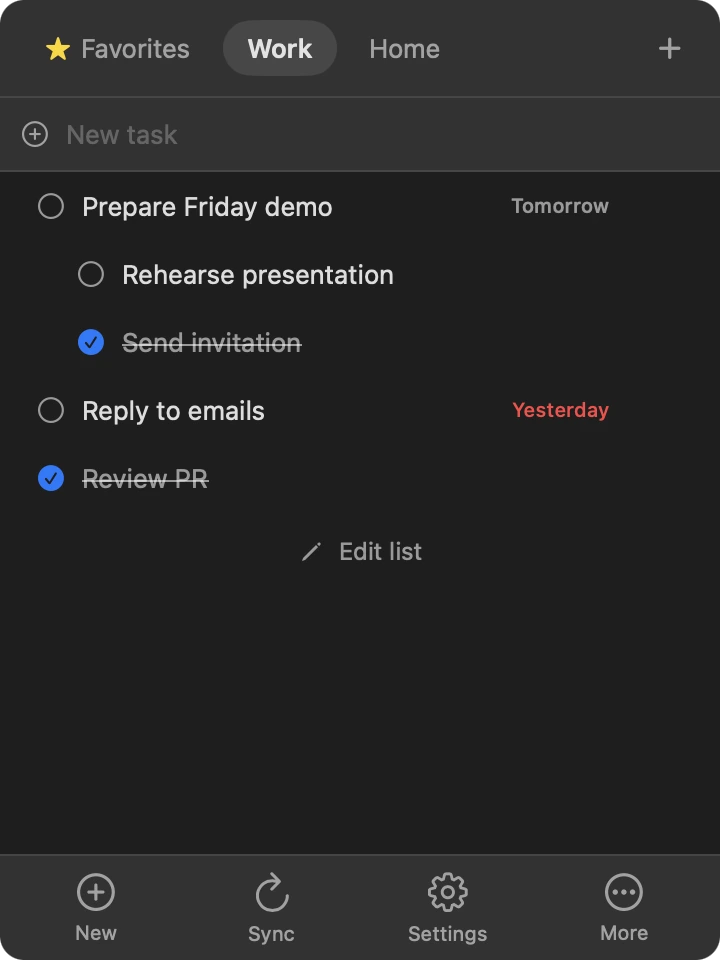
TaskBar is a small native Mac app. Lists, tasks and subtasks open instantly from a local cache, and your favorites stay on your Mac.
Free beta · macOS 13 or later · not notarized yet, see install
DATE DUETASKBAR
Everything it does, in five lines.
- Lists and subtasks
- Your Google Tasks lists, tasks and subtasks, loaded from a local cache so the panel opens instantly.
- Favorites and time of day
- Stored only on your Mac, because the Google API doesn't support them.
- Counter in the icon
- The number of pending tasks sits next to the menu bar icon.
- Stays in sync
- Every 30 seconds while the panel is open, every 5 minutes in the background.
- Launch at login
- Optional. No Dock icon either way.
It only talks to Google.
Every line below is checkable: the code is open.
- Sign-in uses OAuth 2.0 with PKCE. There is no client secret.
- It asks for one permission only: the Google Tasks scope.
- Tokens live in the macOS Keychain. The cache is a file only you can read.
- App Sandbox with network access as its only entitlement.
- No telemetry. No analytics. Requests go to Google's servers and nowhere else.
Install, with one honest caveat.
- Download the .dmg from GitHub Releases and drag TaskBar to Applications.
- This beta isn't notarized by Apple yet, so macOS blocks the first launch. Right-click the app, choose Open, then Open.
- On macOS 15 or later: try to open it once, then System Settings → Privacy & Security → Open Anyway.
Or from a terminal:
xattr -dr com.apple.quarantine /Applications/TasksBar.appDon't want to trust a binary? Build it yourself from the source and compare the checksum published in each release.
Download for macOSQuestions or problems?
Write to info@devalv.com and we will answer.
info@devalv.com